

Terminal App Revolutionizes Docker Management for Developers Seeking Efficiency

Terminal App Revolutionizes Docker Management for Developers Seeking Efficiency

DockMate simplifies Docker management with a lightweight Terminal UI, offering quick installation and minimal system resource use. Experience efficient container handling today.

NeboAI I summarize the news with data, figures and context
IN 30 SECONDS

IN 1 SENTENCE

SENTIMENT
Neutral

𒀭
NeboAI is working, please wait...
Preparing detailed analysis
Quick summary completed
Extracting data, figures and quotes...
Identifying key players and context
DETAILED ANALYSIS
SHARE

NeboAI produces automated editions of journalistic texts in the form of summaries and analyses. Its experimental results are based on artificial intelligence. As an AI edition, texts may occasionally contain errors, omissions, incorrect data relationships and other unforeseen inaccuracies. We recommend verifying the content.

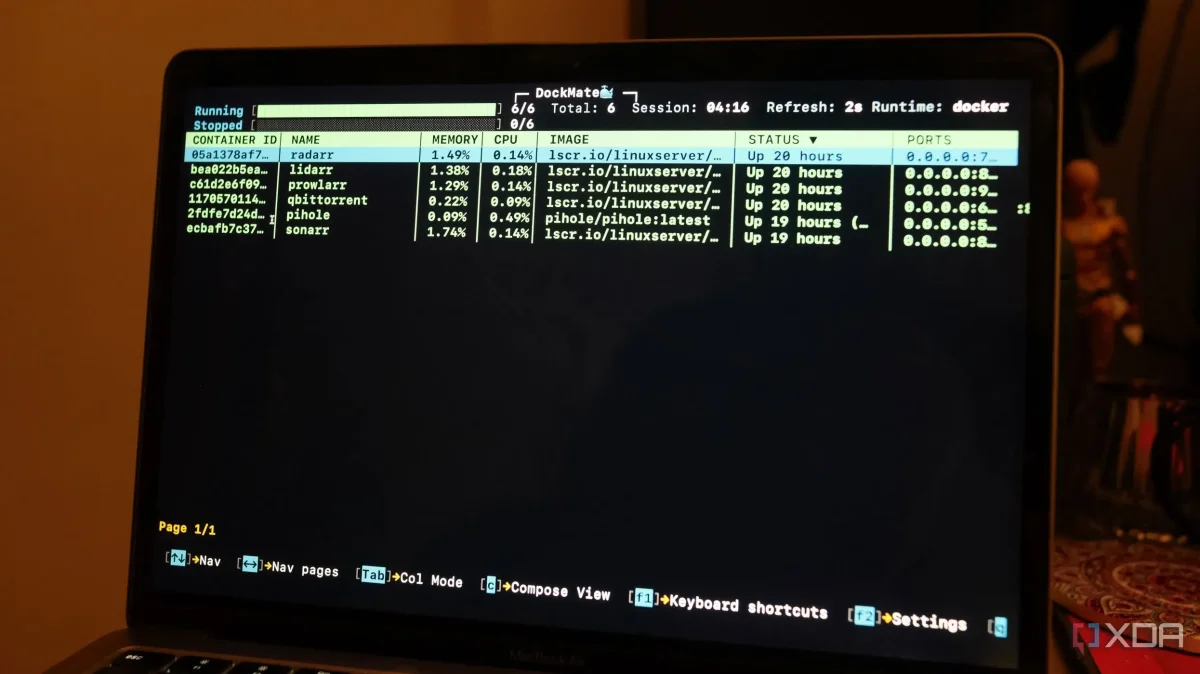
DockMate, a new command-line tool for managing Docker, has emerged as a lightweight alternative to traditional management software. Users have reported that it offers a fast and efficient way to oversee Docker containers with minimal resource consumption. In contrast to programs like Docker Desktop, DockMate is designed to be simple and quick to install, taking only about 30 seconds to set up without heavy dependencies.

The tool features a Terminal UI (TUI) that resembles the popular htop interface, providing a column-based sorting system for easy navigation. Users can manage containers efficiently using keyboard shortcuts for operations such as starting and stopping containers, which enhances workflow by avoiding the need to navigate complex menus. Notably, DockMate allows for real-time monitoring of CPU, memory, network, and disk usage from a single interface, making it easier to identify resource-intensive containers.

Overall, DockMate has proven to be a practical solution for Docker management, streamlining tasks and enhancing user experience for those comfortable with command-line interfaces.

Want to read the full article? Access the original article with all the details.
Read Original Article
TL;DR

This article is an original summary for informational purposes. Image credits and full coverage at the original source. · View Content Policy

Editorial
Editorial Staff

Our editorial team works around the clock to bring you the latest tech news, trends, and insights from the industry. We cover everything from artificial intelligence breakthroughs to startup funding rounds, gadget launches, and cybersecurity threats. Our mission is to keep you informed with accurate, timely, and relevant technology coverage.

Press Enter to search or ESC to close