

Apple's macOS Tahoe icons spark debate over design principles and user experience

Apple's macOS Tahoe icons spark debate over design principles and user experience

Recent critiques of macOS Tahoe icons reveal a return to outdated design practices, with Apple violating its own 1992 guidelines on icon usage, sparking user confusion.

NeboAI I summarize the news with data, figures and context
IN 30 SECONDS

IN 1 SENTENCE

SENTIMENT
Neutral

𒀭
NeboAI is working, please wait...
Preparing detailed analysis
Quick summary completed
Extracting data, figures and quotes...
Identifying key players and context
DETAILED ANALYSIS
SHARE

NeboAI produces automated editions of journalistic texts in the form of summaries and analyses. Its experimental results are based on artificial intelligence. As an AI edition, texts may occasionally contain errors, omissions, incorrect data relationships and other unforeseen inaccuracies. We recommend verifying the content.

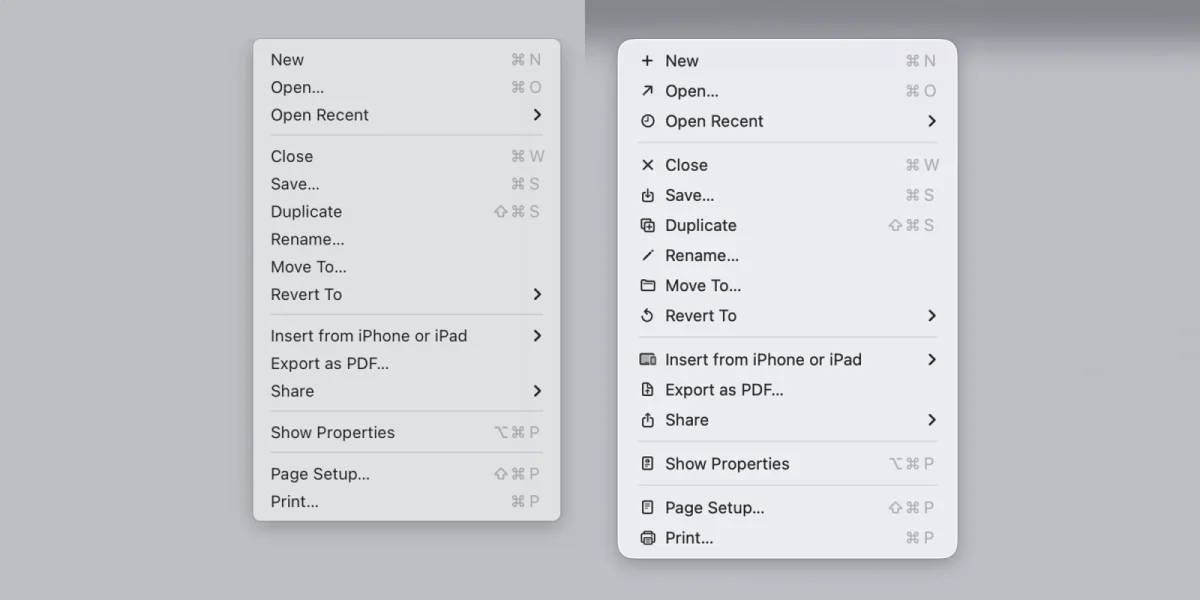
Commenters criticized the new macOS Tahoe app icons, labeling them as “terrible” and “objectively bad.” In a recent poll conducted by 9to5Mac, opinions among readers varied significantly regarding the icons' design. Nikita Prokopov, a software engineer, has highlighted how these icons in menus contradict Apple's own guidelines established in 1992.

Prokopov shared a visual from the original guidelines, which differentiated between an “ugly” menu filled with individual icons and a more effective design featuring minimal icons. He argues that while icon clarity has improved, the proliferation of icons in menus can hinder, rather than help, user experience. He believes that fewer icons, similar to Microsoft's earlier approach, would enhance functionality.

Additionally, Prokopov pointed out inconsistencies in Apple's iconography across different applications, noting that the same icon can represent different functions, such as the "New" function in various apps. His analysis includes numerous examples and suggestions for improvement, advocating for fewer icons and the use of color coding to enhance usability.

Want to read the full article? Access the original article with all the details.
Read Original Article
TL;DR

This article is an original summary for informational purposes. Image credits and full coverage at the original source. · View Content Policy

Editorial
Editorial Staff

Our editorial team works around the clock to bring you the latest tech news, trends, and insights from the industry. We cover everything from artificial intelligence breakthroughs to startup funding rounds, gadget launches, and cybersecurity threats. Our mission is to keep you informed with accurate, timely, and relevant technology coverage.

Press Enter to search or ESC to close