
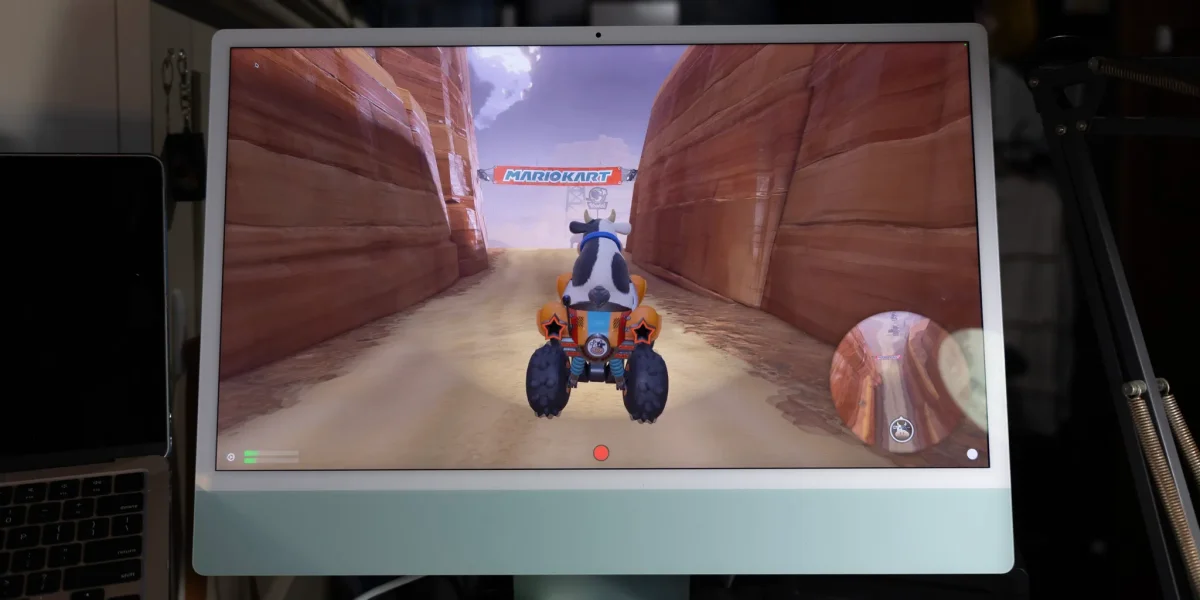

Gaming on the Go: New Accessory Transforms iPad and iMac into 4K Switch 2 Displays

Gaming on the Go: New Accessory Transforms iPad and iMac into 4K Switch 2 Displays

iMacs can now double as gaming displays using a $95 UGREEN capture card and a $9.99 app, allowing seamless streaming from consoles like PS5 and Switch 2. Discover how!

NeboAI I summarize the news with data, figures and context
IN 30 SECONDS

IN 1 SENTENCE

SENTIMENT
Neutral

𒀭
NeboAI is working, please wait...
Preparing detailed analysis
Quick summary completed
Extracting data, figures and quotes...
Identifying key players and context
DETAILED ANALYSIS
SHARE

NeboAI produces automated editions of journalistic texts in the form of summaries and analyses. Its experimental results are based on artificial intelligence. As an AI edition, texts may occasionally contain errors, omissions, incorrect data relationships and other unforeseen inaccuracies. We recommend verifying the content.

Many iMac users have long faced limitations with their displays since the discontinuation of Target Display Mode, which restricted their use to macOS only. Recent solutions have emerged, allowing these high-quality screens to support external devices like the Nintendo Switch 2 and PS5 through a 4K capture card. The UGREEN 4K 60Hz capture card, priced at $95, is highlighted for its compatibility and performance, promising 4K resolution at 60Hz while also supporting HDR.

The process to connect involves using an app from the Mac App Store, UVC Video Capture, which has a subscription fee of $9.99 per year but offers a free trial. Users can also opt for the free app Orion for iPads, which includes a one-time purchase option for enhanced features. This setup enables low latency streaming of content from consoles to the iMac, providing an elegant alternative to traditional television setups.

While these workarounds are effective, there remains a desire among users for Apple to reinstate and expand Target Display Mode to simplify the process and enhance functionality for various USB-C video inputs.

Want to read the full article? Access the original article with all the details.
Read Original Article
TL;DR

This article is an original summary for informational purposes. Image credits and full coverage at the original source. · View Content Policy

Editorial
Editorial Staff

Our editorial team works around the clock to bring you the latest tech news, trends, and insights from the industry. We cover everything from artificial intelligence breakthroughs to startup funding rounds, gadget launches, and cybersecurity threats. Our mission is to keep you informed with accurate, timely, and relevant technology coverage.

Press Enter to search or ESC to close